Turning LIMIT into an I/O Optimization: Inside DataFusion’s Multi-Layer Pruning Stack
Posted on: Fri 20 March 2026 by xudong
Xudong Wang, Massive
Reading data efficiently means touching as little data as possible. The fastest I/O is the I/O you never make. This sounds obvious, but making it happen in practice requires careful engineering at every layer of the query engine. Apache DataFusion achieves this through a multi-layer pruning pipeline — a series of stages that progressively narrow down the data before decoding a single row.
In this post, we describe a new optimization called limit pruning that makes this pipeline aware of SQL LIMIT clauses. By identifying row groups where every row is guaranteed to match the predicate, DataFusion can satisfy a LIMIT query without ever touching partially matching row groups — eliminating wasted I/O entirely.
For example, given a query like:
SELECT * FROM tracking_data
WHERE species LIKE 'Alpine%' AND s >= 50
LIMIT 3
If the pruning pipeline already knows that certain row groups fully satisfy the WHERE clause, those groups alone may contain enough rows to fill the LIMIT — making it unnecessary to scan anything else.
This work was inspired by the "Pruning for LIMIT Queries" section of Snowflake's paper Pruning in Snowflake: Working Smarter, Not Harder.
DataFusion's Pruning Pipeline
Before diving into limit pruning, let's understand the full pruning pipeline. DataFusion scans Parquet data through a series of increasingly fine-grained filters, each one eliminating data so the next stage processes less:
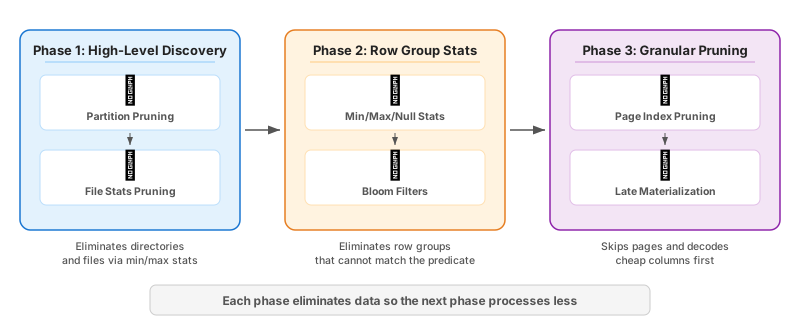
Phase 1: High-Level Discovery
- Partition Pruning: The ListingTable component evaluates filters that depend only on partition columns — things like
year,month, orregionencoded in directory paths (e.g.,s3://data/year=2024/month=01/). Irrelevant directories are eliminated before we even open a file. - File Stats Pruning: The FilePruner checks file-level min/max and null-count statistics. If these statistics prove that a file cannot satisfy the predicate, we drop it entirely — no need to read row group metadata.
Phase 2: Row Group Statistics
For each surviving file, DataFusion reads row group metadata and potentially bloom filters and classifies each row group into one of three states (the example data shown in the figures below, such as "Snow Vole" and "Alpine Ibex", is adapted from the Snowflake pruning paper):
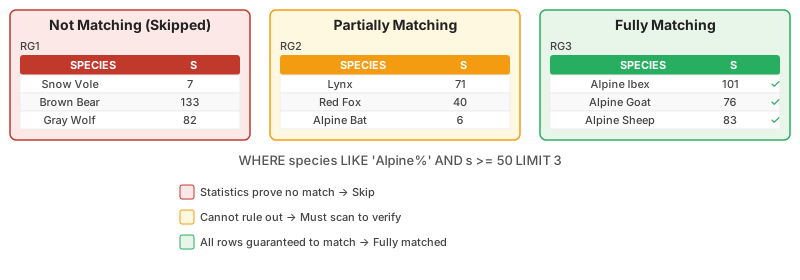
- Not Matching (Skipped): Statistics prove no rows can match. The row group is ignored completely.
- Partially Matching: Statistics cannot rule out matching rows, but also cannot guarantee them. These groups might be scanned and verified row by row later.
- Fully Matching: Statistics prove that every single row in the group satisfies the predicate. This state is key to making limit pruning possible.
Phase 3: Granular Pruning
The final phase goes even deeper:
- Page Index Pruning: Parquet pages have their own min/max statistics. DataFusion uses these to skip individual data pages within a surviving row group.
- Late Materialization (Row Filtering): Instead of decoding all columns at once, DataFusion decodes the cheapest, most selective columns first. It filters rows using those columns, then only decodes the remaining columns for surviving rows.
The Problem: LIMIT Was Ignored
Before limit pruning, all of these stages worked well — but the pruning pipeline had no awareness of LIMIT. Consider a query like:
SELECT * FROM tracking_data
WHERE species LIKE 'Alpine%' AND s >= 50
LIMIT 3
Even when fully matched row groups alone contain enough rows to satisfy the LIMIT, DataFusion would still decode partially matching groups and filter out rows that did not match, wasting resources decoding rows just to immediately discard them.
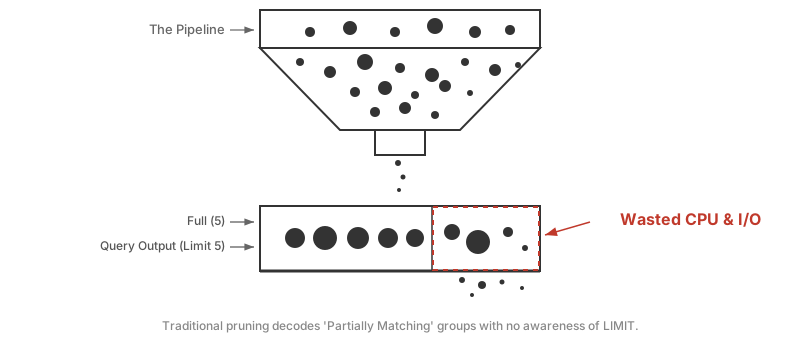
LIMIT 5), while the right section with the dashed red border represents a partially matching group that is still decoded — wasting CPU and I/O on rows that may not match at all.If five fully matched rows in a fully matched group already satisfy LIMIT 5, why bother decoding groups where we're not even sure any rows qualify?
The Solution: Limit-Aware Pruning
The solution adds a new step in the pruning pipeline — right after row group pruning and before page index pruning:

The idea is simple: if fully matched row groups already contain enough rows to satisfy the LIMIT, rewrite the access plan to scan only those groups and skip everything else.
This optimization is applied only when the query is a pure limit query with no ORDER BY, because reordering which groups we scan could change the output ordering of the results. In the implementation, this check is expressed as:
// Prune by limit if limit is set and order is not sensitive
if let (Some(limit), false) = (limit, preserve_order) {
    row_groups.prune_by_limit(limit, rg_metadata, &file_metrics);
}
Mechanism: Detecting Fully Matched Row Groups
The core insight is predicate negation. To determine if every row in a row group satisfies the predicate, we:
- Negate the original predicate
- Simplify the negated expression
- Evaluate the negation against the row group's statistics
- If the negation is pruned (proven impossible), then the original predicate holds for every row
Since DataFusion already had expression simplification (step 2) and statistics-based pruning (step 3), implementing this was relatively straightforward — the key addition was composing these existing capabilities with predicate negation.
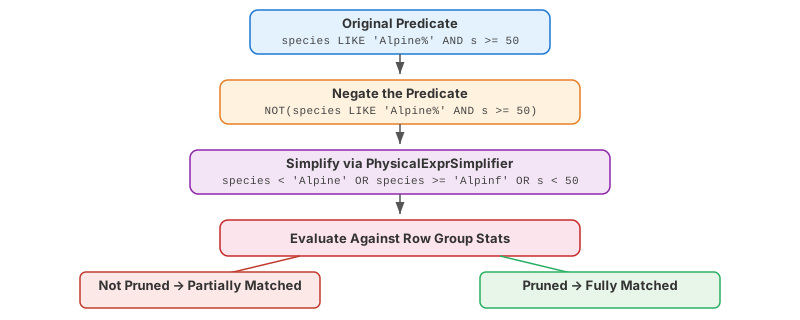
In DataFusion's codebase, this logic lives in identify_fully_matched_row_groups (row_group_filter.rs):
fn identify_fully_matched_row_groups(
    &mut self,
    candidate_row_group_indices: &[usize],
    arrow_schema: &Schema,
    parquet_schema: &SchemaDescriptor,
    groups: &[RowGroupMetaData],
    predicate: &PruningPredicate,
    metrics: &ParquetFileMetrics,
) {
    // Create the inverted predicate: NOT(original)
    let inverted_expr = Arc::new(NotExpr::new(
        Arc::clone(predicate.orig_expr()),
    ));

    // Simplify: e.g., NOT(c1 = 0) → c1 != 0
    let simplifier = PhysicalExprSimplifier::new(arrow_schema);
    let Ok(inverted_expr) = simplifier.simplify(inverted_expr) else {
        return;
    };

    let Ok(inverted_predicate) = PruningPredicate::try_new(
        inverted_expr,
        Arc::clone(predicate.schema()),
    ) else {
        return;
    };

    // Evaluate inverted predicate against row group stats
    let Ok(inverted_values) =
        inverted_predicate.prune(&inverted_pruning_stats)
    else {
        return;
    };

    for (i, &original_idx) in
        candidate_row_group_indices.iter().enumerate()
    {
        // If negation is pruned (false), all rows match original
        if !inverted_values[i] {
            self.is_fully_matched[original_idx] = true;
        }
    }
}
Mechanism: Rewriting the Access Plan
Once we know which row groups are fully matched, the limit pruning algorithm is straightforward:
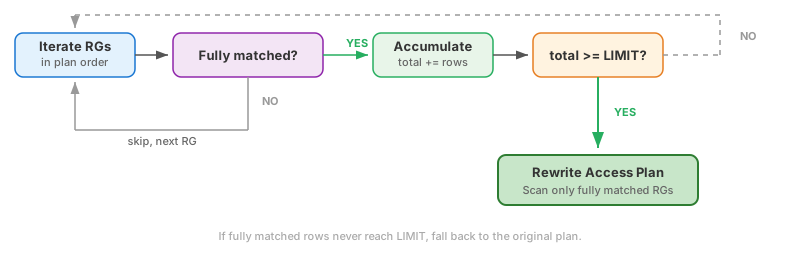
The implementation in prune_by_limit (row_group_filter.rs):
pub fn prune_by_limit(
    &mut self,
    limit: usize,
    rg_metadata: &[RowGroupMetaData],
    metrics: &ParquetFileMetrics,
) {
    let mut fully_matched_indexes: Vec<usize> = Vec::new();
    let mut fully_matched_rows: usize = 0;

    for &idx in self.access_plan.row_group_indexes().iter() {
        if self.is_fully_matched[idx] {
            fully_matched_indexes.push(idx);
            fully_matched_rows += rg_metadata[idx].num_rows() as usize;
            if fully_matched_rows >= limit {
                break;
            }
        }
    }

    // Rewrite the plan if we have enough rows
    if fully_matched_rows >= limit {
        let mut new_plan = ParquetAccessPlan::new_none(rg_metadata.len());
        for &idx in &fully_matched_indexes {
            new_plan.scan(idx);
        }
        self.access_plan = new_plan;
    }
}
Key properties of this algorithm:
- It preserves the original row group ordering
- If fully matched groups don't have enough rows, the plan is unchanged — no harm done
- The cost is minimal: a single pass over the row group list
Case Study: Alpine Wildlife Query
Let's walk through a concrete example adapted from the Snowflake pruning paper. Given a wildlife tracking dataset with four row groups:
SELECT * FROM tracking_data
WHERE species LIKE 'Alpine%' AND s >= 50
LIMIT 3
| Row Group | Species Range | S Range | State |
|---|---|---|---|
| RG1 | Snow Vole, Brown Bear, Gray Wolf | 7–133 | Not Matching (no 'Alpine%') |
| RG2 | Lynx, Red Fox, Alpine Bat | 6–71 | Partially Matching |
| RG3 | Alpine Ibex, Alpine Goat, Alpine Sheep | 76–101 | Fully Matching |
| RG4 | Mixed species | Mixed | Partially Matching |
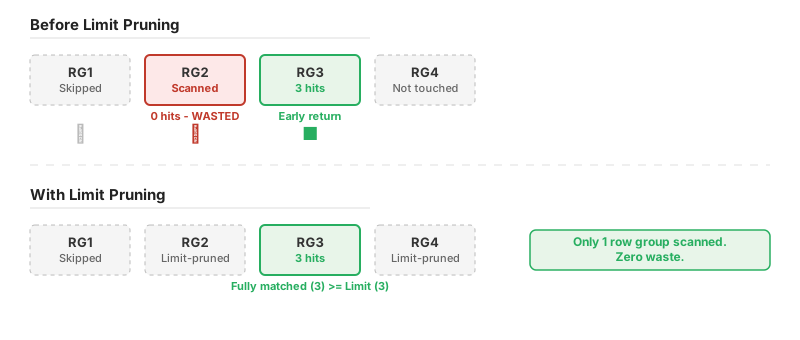
Before limit pruning: DataFusion scans RG2 (0 hits — wasted I/O), then RG3 (3 hits, early return). RG2 was decoded entirely for nothing.
With limit pruning: The system detects that RG3 has 3 fully matched rows, which satisfies LIMIT 3. It rewrites the access plan to scan only RG3, skipping RG2 and RG4 entirely. One row group scanned. Zero waste.
Observing Limit Pruning via Metrics
DataFusion exposes limit pruning activity through query metrics. When running a query with EXPLAIN ANALYZE, you will see entries like:
row_groups_pruned_statistics=4 total → 3 matched -> 1 fully matched
limit_pruned_row_groups=3 total → 1 matched
This tells us: - 4 row groups were evaluated, 3 survived statistics pruning, 1 was identified as fully matching - Of the 3 row groups that entered limit pruning, only 1 survived — 2 were pruned by the limit optimization
Future Directions
There are two natural extensions of this work:
Page-Level Limit Pruning: Today, "fully matched" detection operates at the row group level. If we extend this to use page index statistics, we could stop decoding pages within a row group once the limit is met. This would pay dividends for wide row groups where only a few pages hold matching data.
Row Filter Hints: Even when a row group is fully matched, the current row filter still evaluates predicates row by row. If we pass the fully matched groups info into the row filter builder, we can skip predicate evaluation entirely for guaranteed groups — saving CPU cycles on predicate evaluation.
Summary
DataFusion's pruning pipeline trims redundant I/O from the partition level all the way down to individual rows. Limit pruning adds a new step that creates an early exit when fully matched row groups already satisfy the LIMIT. The result is fewer row groups scanned, less data decoded, and faster queries.
The key insights are: 1. Predicate negation can identify row groups where all rows match — not just "some might match" 2. Row count accumulation across fully matched groups enables early termination
About DataFusion
Apache DataFusion is an extensible query engine, written in Rust, that uses Apache Arrow as its in-memory format. DataFusion is used by developers to create new, fast, data-centric systems such as databases, dataframe libraries, and machine learning and streaming applications.
DataFusion's core thesis is that, as a community, together we can build much more advanced technology than any of us as individuals or companies could build alone.
How to Get Involved
If you are interested in contributing, we would love to have you. You can try out DataFusion on some of your own data and projects and let us know how it goes, contribute suggestions, documentation, bug reports, or a PR with documentation, tests, or code. A list of open issues suitable for beginners is here, and you can find out how to reach us on the communication doc.