Optimizing for Almost Sorted Data: Sort Pushdown in Apache DataFusion
Posted on: Mon 20 July 2026 by Qi Zhu and Andrew Lamb
Qi Zhu (Massive); Andrew Lamb (InfluxData)
Apache DataFusion uses sortedness automatically — even when data is only partially sorted or when no ordering was declared. This post explains how plan-time sort pushdown, runtime scan reordering, and row-group pruning driven by dynamic filters make that possible.
Are Real Datasets Sorted?
Sorting data is prohibitively expensive for many workloads, so maintaining it in fully sorted order is often not practical. However, many real datasets are at least partly sorted when stored: time-series files by ingestion time, event logs by event id, partitioned tables by partition key, and data lakes based on Apache Iceberg and similar formats in write order.
Sortedness only helps if the query engine can detect and use it. Two common cases make that hard:
- The ordering is undeclared in the file. For example, the writer did not set Parquet sorting_columns, or the table was not created with DataFusion's WITH ORDER clause.
- Files are individually sorted, but the engine is scanning multiple files and does not know a global ordering at plan time.
In both cases, queries with ORDER BY or ORDER BY ... LIMIT N pay for a full
scan and sometimes a blocking full sort, which buffers every row and can
dominate latency and peak memory on large scans.
Using min/max statistics for predicate pushdown is well-known and widely
implemented across databases, as covered in @XiangpengHao's
post on Parquet pruning. Using the same
statistics to reason about sort order and to prune ORDER BY ... LIMIT
(top-k) queries is also increasingly common, for example in the
Pruning in Snowflake: Working Smarter, Not Harder paper (see Related Work for more).
This post describes several such techniques for a general audience,
including the less-common case of discovering a
global sort order from per-file statistics,
deleting redundant sorts, and biasing scan order toward the
most-promising data.
Exact vs. Inexact Ordering
DataFusion has long skipped sorts when it knows the data is exactly sorted, as covered in
@akurmustafa's earlier post:
if the table declares an ordering (via WITH ORDER or Parquet
sorting_columns) and the file listing matches it, the redundant sort is removed.
This post is about the messier real-world cases where sortedness exists but is inexact or not provable up front:
- Files listed in the "wrong" order on disk (each file is internally sorted, but the files are not globally ordered).
- Ordering is known, but the sort key ranges overlap across files.
- No declared ordering at all.
ORDER BY ... DESCon ASC-sorted data.
This post describes two primary techniques:
- Statistics-based sort elimination (
Exact): avoids sorts entirely by reordering files by min/max statistics to create a global ordering. This extends DataFusion's existing statistics-based file-group ordering (#9593) and is similar to prior work on concatenating disjoint ranges. - Runtime reorder and dynamic pruning (
Inexact): reorders the scan to read the most-promising data first, then re-checks theTopKdynamic filter at file and row-group boundaries.
These techniques are implemented in DataFusion and together result in:
- Sort elimination: 2×–49× faster on
ORDER BYandORDER BY ... LIMITqueries where the file list was in the wrong disk order. - Runtime row-group pruning: 5 of 11 benchmark queries run ≥2× faster (up to ~4×) with zero regressions; total runtime drops by 44%.
The rest of this post walks through each technique in detail.
Tracking Ordering
The PushdownSort
optimizer rule classifies each scan below a sort as either Exact,
Inexact, or Unsupported, and records this information on DataFusion's
FileScanConfig:
Exact— the optimizer is certain of the output order, and removes redundant SortExec operators entirely.Inexact— the optimizer believes the output is probably ordered but cannot prove it, so the sort is kept but the scan is biased to read the most-promising data first.Unsupported— the optimizer cannot determine the ordering, so no sort is removed.
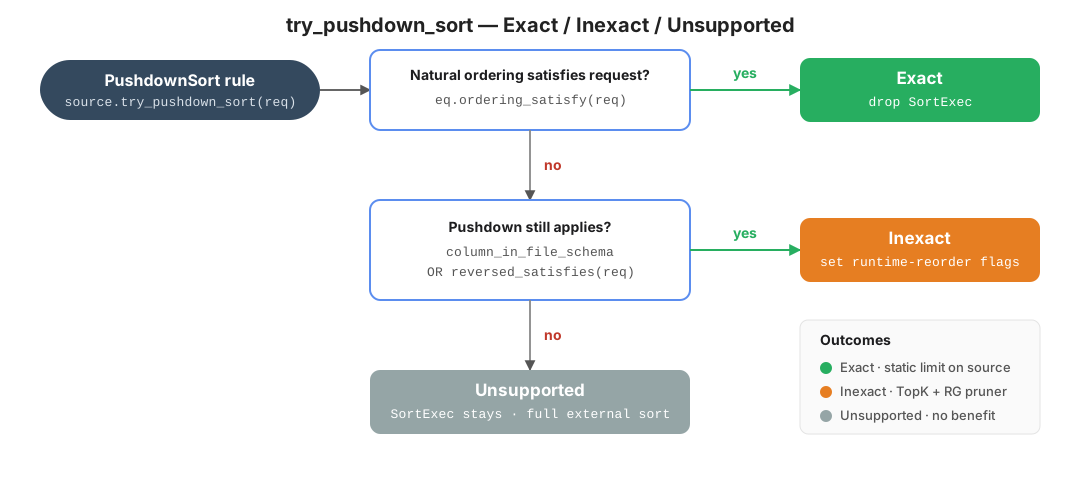
Figure: the PushdownSort rule asks each scan whether it can satisfy the
required ordering, returning Exact (drop the sort), Inexact (bias the scan
and keep the sort), or Unsupported (the sort stays).
For example, given a query that returns the 10 most recent trades:
SELECT ts, symbol, amount FROM trades ORDER BY ts DESC LIMIT 10;
- With
Exactordering knowledge, DataFusion drops the sort entirely and stops reading after emitting 10 rows. - With
Inexactordering, theSortExecstays but scans start from the most-promising data, so theTopKthreshold is more likely to tighten quickly and prune the rest with statistics. - With no ordering knowledge, DataFusion scans everything and uses a
TopKheap to keep the running best 10.
Exact: Sort Elimination via Statistics
DataFusion can eliminate sorts entirely when it can use Parquet min/max statistics to reorder files and prove a global ordering (relevant PRs: #19064 and #21182) as shown below.
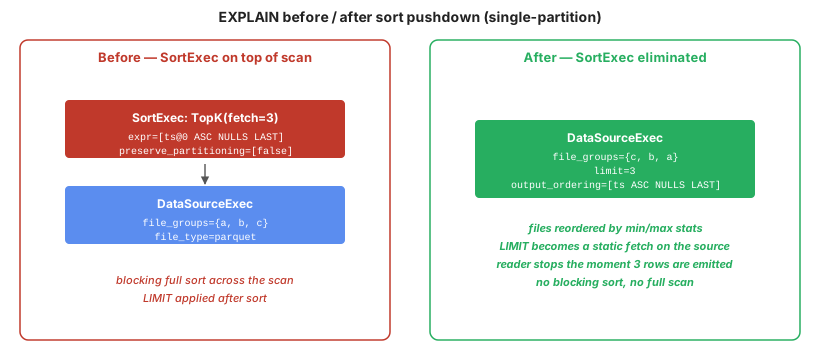 Figure: EXPLAIN output before and after
 PushdownSort eliminates the sort. The SortExec is removed and the scan's ordering claim is upgraded to Exact.
For example, consider three files a.parquet, b.parquet, c.parquet. Each is
internally sorted by ts and the time ranges do not overlap, but the files were
written by different jobs. Without this optimization, a query engine is forced to
use a full sort for ORDER BY ts queries, even though it could simply read the
files one after another and produce the correct result.
The Exact path requires each file to be
individually sorted on the key, and DataFusion knows this from the declared
ordering (WITH ORDER or Parquet sorting_columns).
Concatenating the files in min/max range order yields a globally sorted stream
only when that per-file precondition holds. When no per-file ordering is declared, the
Inexact path (described next) applies instead.
PushdownSort fixes this in three steps at the file-scan node:
- Sort the file list by per-file
minon the sort column. - Check overlap: does
file[i].max ≤ file[i+1].minhold for every adjacent pair? If yes, the sorted file list produces a globally sorted stream. - Upgrade the source's ordering claim to
Exactand remove the surroundingSort. Note that this requires some additional performance optimizations described in appendix on buffering without sorting.
This is an instance of what Graefe calls virtual concatenation, and is similar to LSM "trivial move" compaction (see Related Work). It is less common to discover the disjoint ranges from per-file min/max statistics rather than from a declared partitioning scheme.
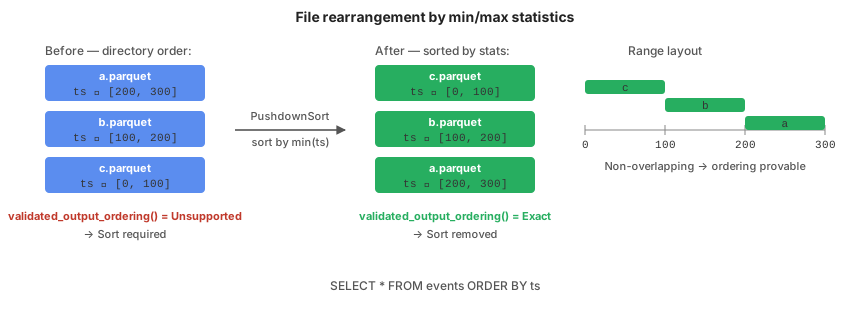
Figure: reordering by per-file min/max puts the file list in range order.
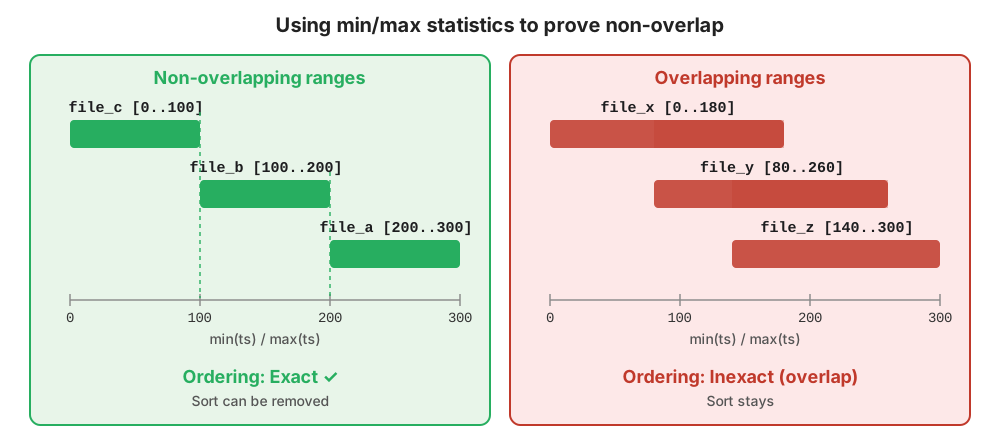
Figure: PushdownSort sorts files by min and checks adjacency,
upgrading to Exact only when the ranges don't overlap. Left: non-overlapping
ranges are safe to upgrade to Exact and the sort is removed; right:
overlapping ranges keep the sort and fall through to the Inexact path described next.
We measured the single-core performance of statistics-based sort elimination with DataFusion's
sort_pushdown benchmark suite
by setting --partitions 1. The results are as follows:
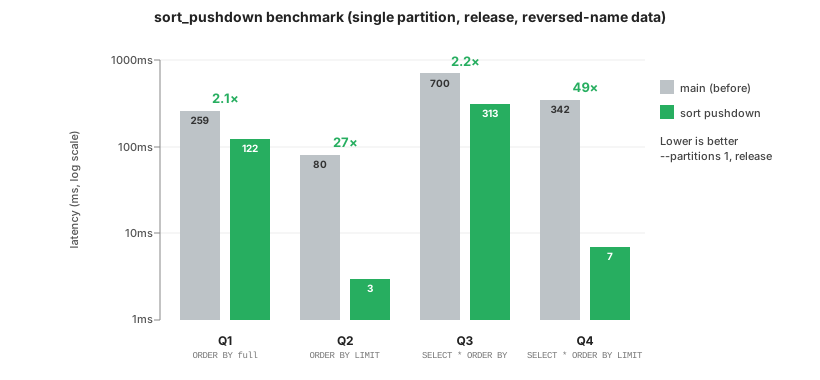
| Query | Before | After | Speedup |
|---|---|---|---|
Q1 — ORDER BY key (full scan) |
259 ms | 122 ms | 2.1× |
Q2 — ORDER BY key LIMIT 100 |
80 ms | 3 ms | 27× |
Q3 — SELECT * ORDER BY key |
700 ms | 313 ms | 2.2× |
Q4 — SELECT * ORDER BY key LIMIT 100 |
342 ms | 7 ms | 49× |
Figure: sort_pushdown results. All four queries are ASC ORDER BY where the
file list on disk is in the reverse of sort-key order; a naive engine sorts even
though the files are already individually sorted.
While DataFusion can avoid sorting for all four queries, the benefit is most
dramatic for LIMIT queries:
- Full-scan queries (Q1, Q3) result in a ~2× speedup as the scan is now a single-pass streaming read.
LIMITqueries (Q2, Q4) result in a 27×–49× speedup becauseLIMIT Nturns into a streaming read with early stopping.
Inexact: Scan Reordering Makes Dynamic Filters More Effective
It is not possible to eliminate the sort when the files have
overlapping sort key ranges. However, it is still possible to use sorted or
partly sorted data to optimize LIMIT queries. By reordering the read,
data that is most likely to improve the TopK dynamic filter is seen first and
the filter is more effective at pruning files, row groups, and rows that cannot
possibly contribute to the final result.
This Inexact path is used when Parquet min/max statistics are available
and the sort expression is supported by DataFusion's
equivalence-properties, including plain columns, monotonic
functions1, constants inferred from filters,
and multi-column orderings. The same dynamic filter is used to drive three layers of pruning:
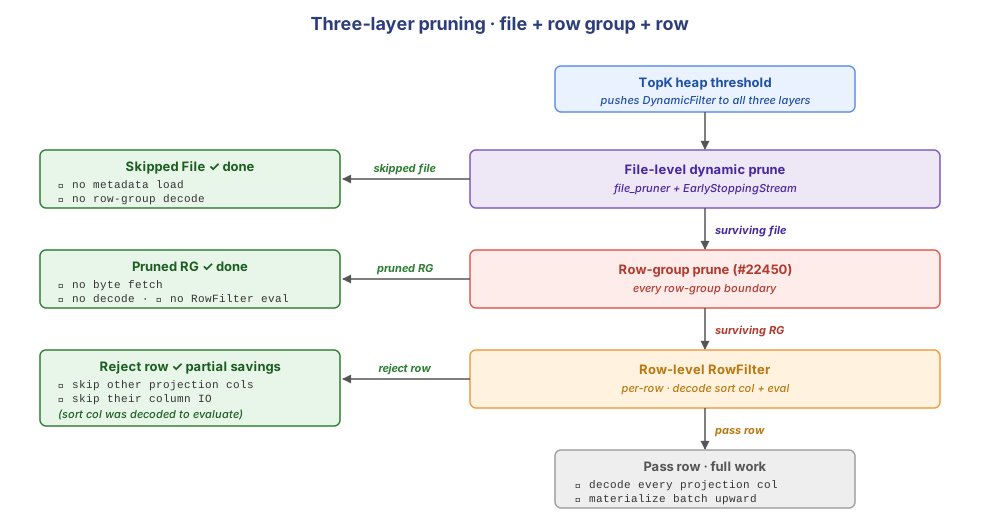
Figure: the Parquet reader applies three pruning layers, all driven by the same TopK dynamic filter.
- File-level pruning (file_pruner + EarlyStoppingStream) — skips whole files before they are opened.
- Row-group-level pruning (#22450) — skips whole row groups at each boundary, before any pages are fetched.
- Row-level filtering (RowFilter) — skips decoding the remaining columns in a surviving row group.
When Inexact applies, the Parquet opener reorders
the scan before and during execution using three steps:

Figure: the Parquet opener applies file-level reordering, row-group-level reordering, and an optional iteration reverse.
- File-level reordering — the file list is sorted by
min(col), so the most-promising file is picked first across all partitions. - Row-group-level reordering — once a file is opened, its row groups
are sorted by
min(col). - Iteration reverse — for
DESCqueries, the file and row-group order is reversed.
File-Level Pruning: once files are ordered "most-promising first", the
TopK's heap fills quickly and its dynamic filter threshold tightens. The
FilePruner then cuts low-value files before opening them, as shown in the
following example.
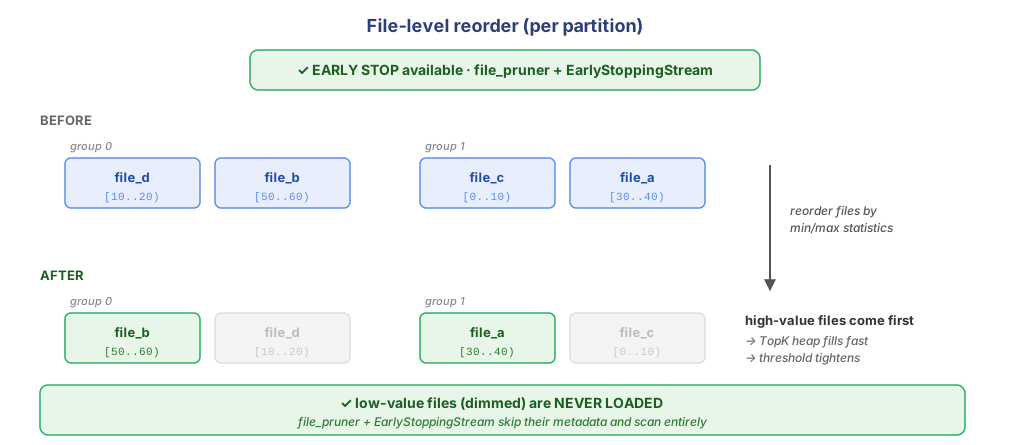
Figure: after reordering files by their sort key, the low sort-key value files (file_d and file_c,
whose sort-key values are least promising for this DESC LIMIT query)
end up at the tail of the read queue and are pruned by the file-level pruner before they
are ever opened.
Row-Group-Level Pruning: When a file is first opened, DataFusion prunes
row groups based on predicates and statistics, and then determines
the order to scan the row groups. During the scan, immediately before DataFusion
reads the next row group, it checks whether the TopK dynamic filter has changed. If so,
it re-evaluates the remaining row groups against the new threshold and
prunes any that cannot contribute to the final result (added in #22450). See the
Appendix: Decoder Loop and Decision Point for more details.
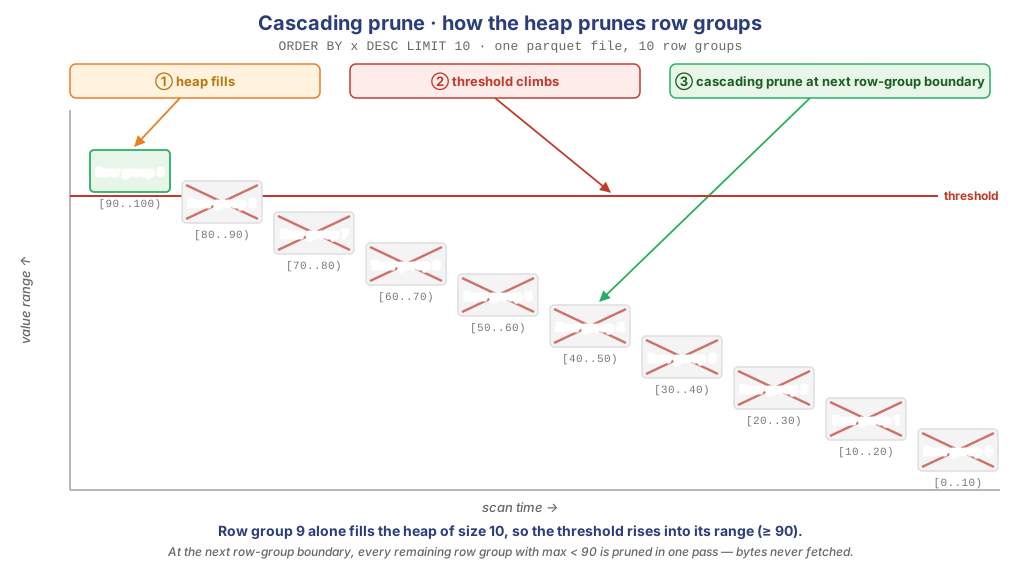
Figure: for ORDER BY x DESC LIMIT 10, after reading the first row group, DataFusion prunes the rest of the row groups in a single pass (walkthrough below).
For the example shown above, the file has 10 row groups, each containing rows with values
[0..10), [10..20), ..., [90..100) and the query is ORDER BY x DESC LIMIT 10.
- The row groups are first reordered by their maximum values, so the highest-value row group is read first.
- Row group 9 (values
[90..100)) is opened and read, filling the heap with 10 values (the minimum heap value is90). TheTopKdynamic filter threshold is updated to90. - At the next row-group boundary, the pruner sees the dynamic filter has been updated
and re-evaluates the filter on all remaining row groups. Since row group 8
through row group 0 have
max < 90, they are all pruned and skipped in a single pass. - The scan ends early, having read only one row group instead of all 10.
Note that for the row groups that were skipped, no data is fetched or decoded. This example shows the core benefit provided by runtime row-group dynamic pruning: reading a single row group can cascade-eliminate every remaining row group.
Row-Level Early Stopping: Even if the row group cannot be pruned with statistics,
the tightened dynamic filter often rules out all rows after evaluating just the
filter columns. When it does, arrow-rs's RowFilter skips fetching the projection
columns for that row group entirely. #22450 makes this fire more often
by keeping the threshold up-to-date at every row-group boundary.
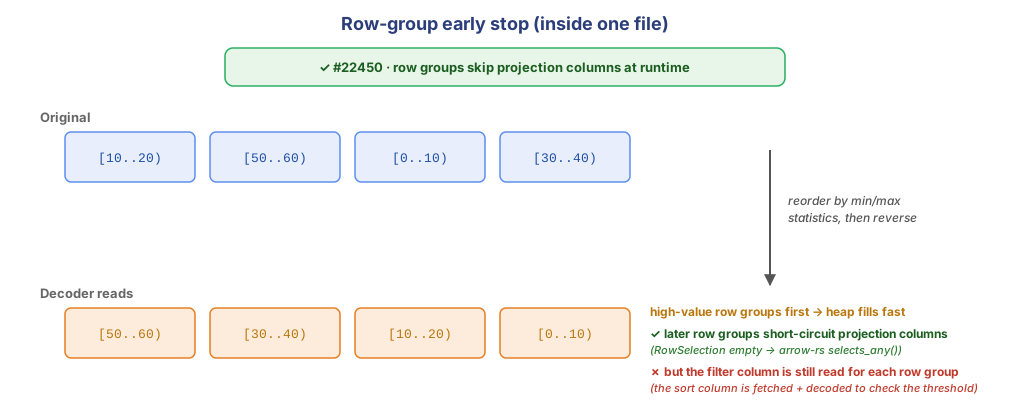
Figure: inside a file, the first row group tightens the threshold — subsequent row groups have their projection columns short-circuited, but the filter column still has to be read to discover that no rows qualify.
Benchmark: sort_tpch
To test the overall benefit of this work, we used DataFusion's
sort_tpch
benchmark that runs 11 queries over the TPC-H SF1 dataset, each with
ORDER BY ... LIMIT 100. The data is stored in Parquet files, sorted by
l_orderkey. For the largest table, lineitem, l_orderkey is a BIGINT with ~1.5M
distinct values, so per-row-group min/max ranges are cleanly disjoint.
We compared DataFusion with the sort optimizations enabled (the default) and disabled.
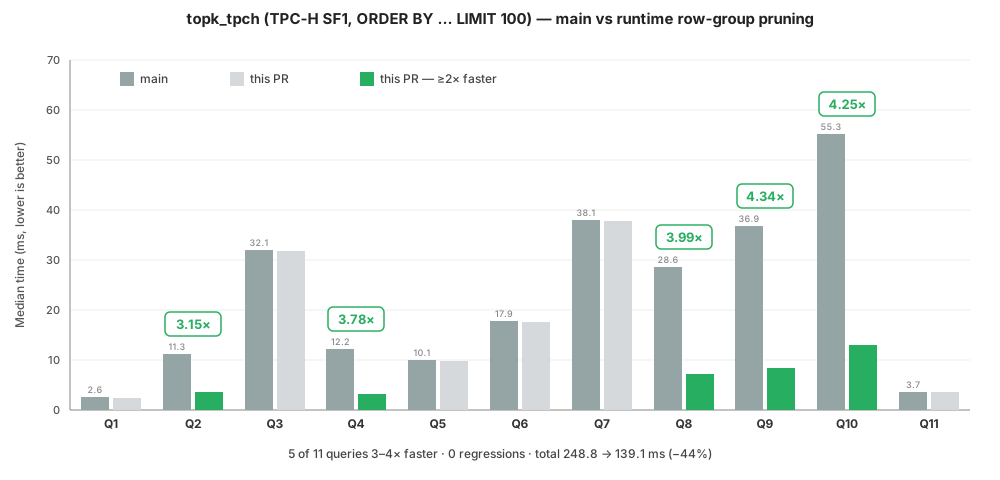
| Metric | Value |
|---|---|
| Total wall-clock (sum of 11 queries) | 248.8 ms → 139.1 ms (−44%) |
| Queries with ≥2× speedup | 5 of 11 (Q2, Q4, Q8, Q9, Q10) |
| Queries with regression | 0 |
| Best single-query speedup | ~4× |
Per-query raw numbers are available in the #22450 benchmark run.
The five queries that improved use l_orderkey as the first sort key column, so
row-group-level pruning can cascade-prune aggressively. The other queries have multi-column
sorts with
low-cardinality or unsorted columns (l_linenumber, l_comment,
l_shipmode), whose per-row-group ranges overlap heavily. Even when l_orderkey
appears later as a tie-breaker, the leading key controls row-group-level disjointness,
so row-level filtering is still partially effective.
Conclusion and Future Work
Use cases where the query sort key (e.g. ORDER BY time DESC LIMIT 10) is
aligned with the physical layout (e.g. the data is ordered by time) are common
in time-series, partitioned tables, and ingestion-ordered event logs. Over the
last few DataFusion releases, we implemented several optimizations that make
these workloads up to ~4× faster without slowing down queries for which they
don't apply. We hope you enjoy using them and welcome your feedback.
Two follow-ups are open: page-level Exact reverse would let DESC queries drop the sort
but needs lower-level support in the Parquet reader (arrow-rs#9937)
for reading pages in reverse order.
We are also considering implementing page-level dynamic pruning at
row-group boundaries (#23216)
using the same pattern one level deeper in Parquet.
Acknowledgements
Thank you to @adriangb, @xudong963, @2010YOUY01, and @Dandandan for reviewing the design and the patches across many iterations. The DataFusion community's willingness to engage deeply with optimizer changes, including ones that touch foundational code like the Parquet inner decode loop, is what made this work possible.
We also thank Massive and InfluxData for sponsoring this work.
1 For example, if the source declares
ts DESC, reversing that ordering gives ts ASC, which can satisfy
date_trunc('day', ts) ASC.
Get Involved
- Try it out: Run your
ORDER BY/ORDER BY ... LIMIT Nqueries on your own data and share what you see. - Work on a good first issue, or pick up one of the follow-ups listed in the umbrella issue.
- File issues or join the conversation: GitHub for bugs and feature requests, Slack or Discord for discussion.
- Learn more by visiting the DataFusion project page.
Related Work
The ideas in this blog build on a long line of research, and several other systems implement closely related techniques.
Exploiting and proving sort order. Reasoning about orderings to eliminate redundant sorts goes back to "interesting orders" in System R (Selinger et al., SIGMOD 1979) and was formalized by Simmen, Shekita, and Malkemus (SIGMOD 1996). Those techniques derive orderings from schema — declared keys, indexes, and functional dependencies — whereas we derive them from per-file min/max statistics. Concatenating disjoint key ranges rather than merging them is Graefe's virtual concatenation (ACM Computing Surveys 2006) — an idea rooted further back in range-partitioned parallel sort (Graefe, ACM Computing Surveys 1993). It also appears as "trivial move" compaction in LSM trees (RocksDB). For declared partition bounds, the "concatenate, don't merge" optimization appears in TimescaleDB's OrderedAppend and PostgreSQL's ordered partition scans.
Top-k early termination and threshold pushdown. Using a running threshold to stop early is described in Fagin's Threshold Algorithm (PODS 2001), with index choice for faster convergence explored in IO-Top-k (VLDB 2006); see Ilyas et al. (ACM Computing Surveys 2008) for a survey. Pushing a live top-k boundary value into a columnar scan to skip blocks via min/max is described for Snowflake in Pruning in Snowflake: Working Smarter, Not Harder and ships in ClickHouse (granule-level top-N skipping), DuckDB (dynamic Top-N table filters), PolarDB-IMCI (self-sharpening runtime filters), and InfluxDB IOx (ProgressiveEvalExec).
Reverse scans and data skipping. Reading physically-ordered data in
reverse to satisfy DESC ... LIMIT is a well-known technique in traditional
databases (backward/descending index scans in PostgreSQL and Oracle).
Min/max block skipping itself originates with
Small Materialized Aggregates (Moerkotte, VLDB 1998) and is
now ubiquitous across columnar storage formats and query engines.
References
Umbrella issue tracking the entire effort:
- [EPIC] Sort Pushdown · skip sorts and skip IO for ORDER BY / TopK queries: #23036 — phase-by-phase status of all the PRs and follow-ups.
Major PRs:
MinMaxStatisticsfoundation: #9593PushdownSortrule + row-group reverse: #19064- Reverse-output redesign: #19446, #19557
- Sort elimination via statistics: #21182
BufferExeccapacity for sort elimination: #21426- Push-based Parquet decoder (DataFusion owns the loop): #20839
- Morsel-style work scheduling: #21351
- Runtime reorder for
TopKconvergence: #21956 - Runtime row-group dynamic pruning (#22450) — the centerpiece of this post.
peek_next_row_groupAPI (arrow-rs): arrow-rs#10158 — enables per-RGfully_matchedRowFilter skip.
In flight / open:
- Page-level reverse (arrow-rs): arrow-rs#9937, discussion in arrow-rs#9934
- Per-RG
fully_matchedRowFilter skip on top of #22450 (uses arrow-rs#10158): #23067 - Page-level dynamic prune at RG boundary: #23216
- Multi-column / function-wrapped stats reorder follow-ups: #22198
Benchmark suites: sort_pushdown, sort_tpch.
Appendix: Buffering Without Sorting
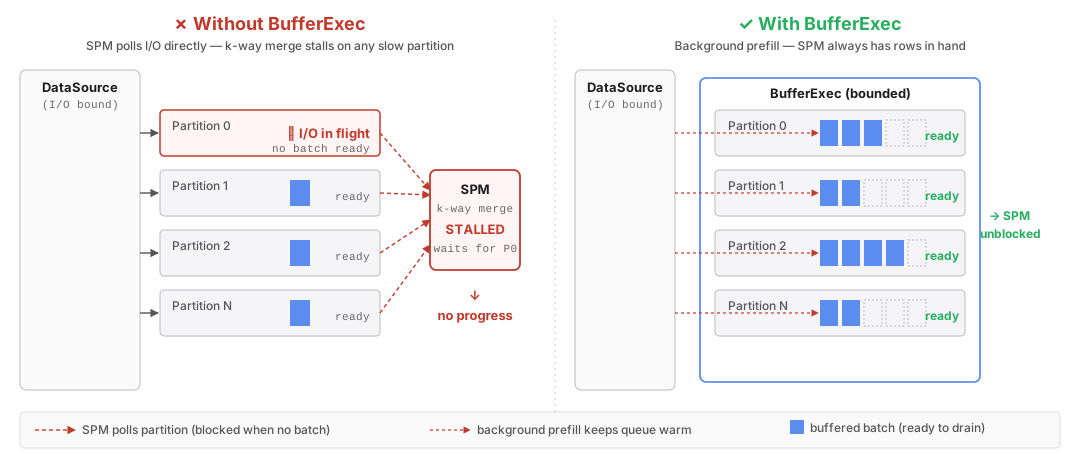
Figure: removing the per-partition SortExec leaves the top-of-plan
merge (SortPreservingMergeExec) directly consuming raw I/O; a stall
on any partition stalls the whole plan.
Removing SortExec was not always faster in multi-partition plans: the deleted
sort had also acted as an implicit buffer. The fix was explicit buffering in
some plans; see
#21426
for details, as shown in the following figure.
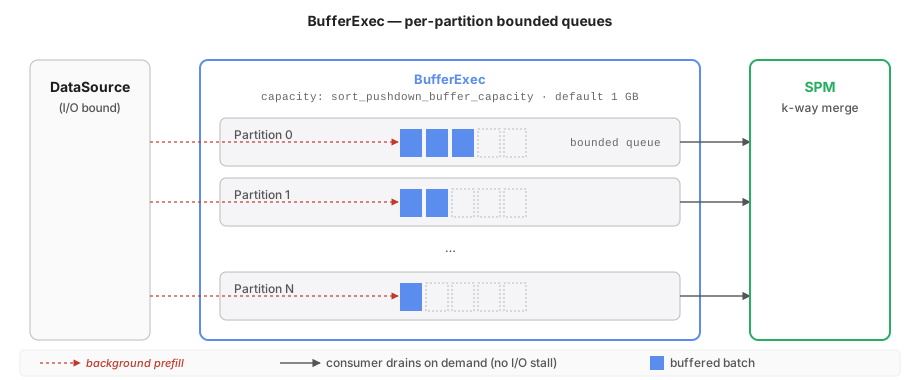
Figure: BufferExec is inserted where the SortExec used to live —
same greedy per-partition prefill, but no blocking sort.
The fix is BufferExec: a bounded per-partition prefill buffer that restores the greedy parallel I/O driver role without sorting.
Appendix: Decoder Loop and Decision Point
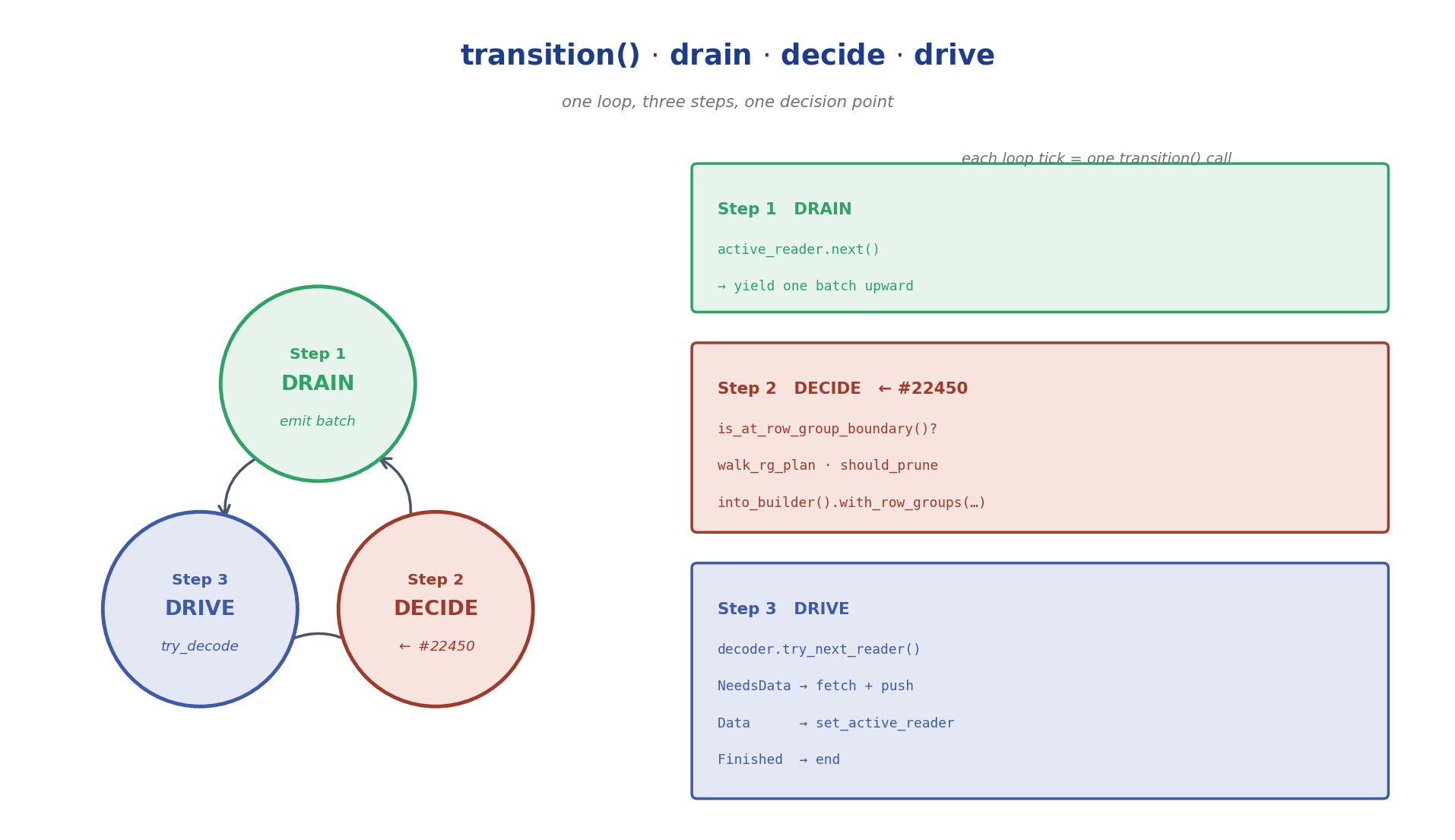
Figure: the decoder loop has three steps. Step 2 (DECIDE) is what
#22450 adds — it only fires at row-group boundaries.
The loop body reads: drain the current row group's batches until it's exhausted; decide at the boundary whether any of the remaining row groups can be dropped based on the live threshold; then drive the decoder into the next row group and repeat. Inside a row group, only drain and drive run — no decision point.
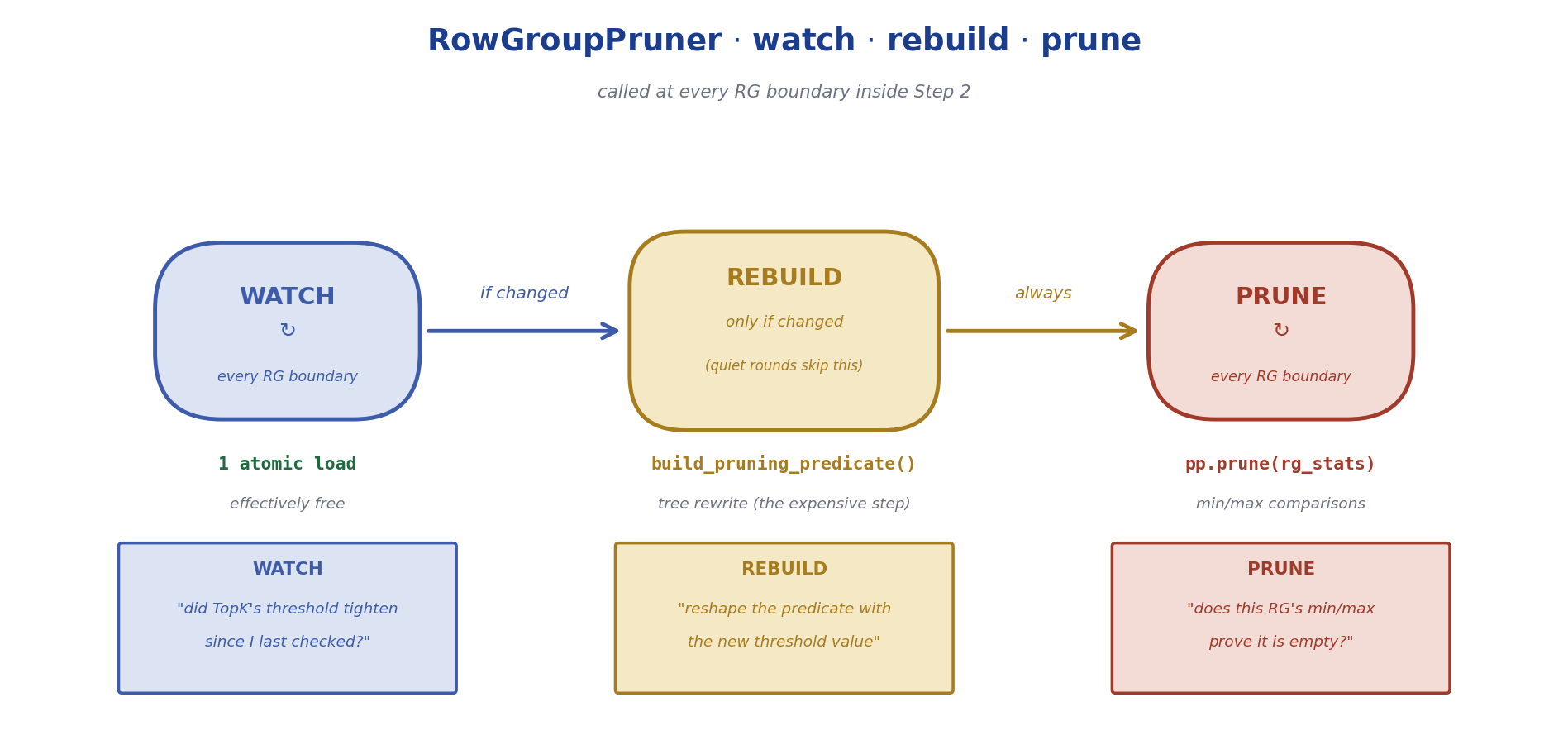
Figure: the pruner has a cheap "check if the filter changed" step, a
moderately expensive "rebuild the predicate if so" step, and a cheap
"apply the predicate to remaining row groups" step.
The pruner does expensive work only when it can help: a cheap epoch check detects dynamic-filter changes, and only then rebuilds the pruning predicate. The predicate is then applied to remaining row groups' min/max statistics using metadata only.