Best Practices for Single Row Lookups (Point Queries)
Posted on: Sat 24 October 2026 by Nuno Faria (INESC TEC)
This blog post covers different techniques to improve the performance of point queries in DataFusion. It is based on a talk (slides, recording) given at the Boston DataFusion meetup, in September 2026.
Introduction
While DataFusion is commonly seen as an engine to run analytical workloads -- which are comprised by queries that access large sets of data -- some of its users regularly require random lookups to large files. During the DataFusion meetup in Boston, I met several community members that shared their experiences with these types of workloads, and how they hit some of the same challenges I highlighted in my talk.
For this blog post, I will cover some best practices on how to handle random lookups (aka point reads) based on my past experience with these workloads in DataFusion. Since we usually have many more queries to execute comparatively to analytical workloads, the challenge here is completing each query as fast as possible (< 1ms) to achieve a reasonable throughput.
The first part goes over optimizations in the storage (in this case, Parquet files), while the second optimizes the execution in DataFusion.
Methodology
The dataset we will be using here is formed by a single Parquet file with 100M
rows (unless otherwise stated), using a key (bigint, unique) and value
(varchar, md5 of the key) columns, generated with the following code:
select i as k, md5(i::varchar) as v
from generate_series(1, {rows}) t(i)
Unless otherwise stated, the queries tested retrieve a random row from the table
by key (i.e., select v from t where k = {}). Most tests run on a
c4d-standard-4 (4 vCPUs, 15GB RAM) Google Cloud virtual machine, using a 100GB
HyperDisk (6k IOPS, 500 MB/s) to store the data. The Runtime test
uses a machine with more CPU cores (c4d-highcpu-8). Each test builds on the
last.
Storage (Optimizing Parquet Settings)
File Ordering
Having the Parquet file sorted by key will allow random lookups to access the
minimum amount of data, assuming our predicate is also based on the key. To
confirm this, the first test measures the throughput of random reads against a
sorted (True) and non sorted (False) file:
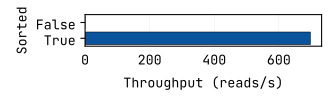
Figure 1: Throughput with (True) and without
(False) a sorted file.
The overall throughput of the sorted version is 6000x faster than the non-sorted one (which is not even visible in the plot). In this case, the execution plans show that the non-sorted version needs to access, on average, 67 row groups and 122 total pages, while the sorted version only accesses one page in one group.
In case you are not familiar, Parquet files are divided into multiple row groups, with each column in each group divided into multiple pages (more details in the official Parquet documentation). DataFusion uses the min/max statistics for each group/page to determine if it needs to access it or not. If the file is not sorted, the min/max bounds will be wide, forcing more groups/pages to be accessed, as illustrated in the diagram below:
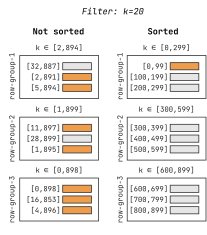
Figure 2: Example structure of a sorted and non sorted Parquet
file. The orange pages are the ones matched by the predicate
k=20.
Additional Metadata
By default, DataFusion writes Parquet files with dictionary encoding enabled. Dictionary encoding maps column values to integers in an attempt to compact the space used, working pretty well for columns that have many duplicate values. The figure below shows a small example of how it works in practice:
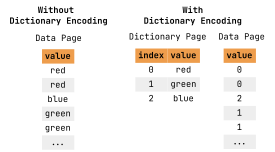
Figure 4: Illustration of dictionary encoding.
However, if a column contains many distinct values (which is the case in our
dataset), the dictionary will only add overhead. The following test compares
enabling (True, default) and disabling (False) the dictionary, showing that
the latter achieves a higher throughput:
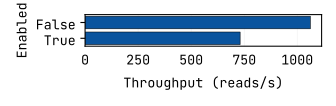
Figure 5: Throughput with and without dictionary encoding.
Another optional metadata commonly used in Parquet files are bloom filters, which much like min/max statistics help speedup predicates. In the context of Parquet files, a bloom filter is an array of bits that can determine if a value is definitely not or maybe is in a specific row group. Figure 6 provides a small example of a bloom filter and two different predicates.
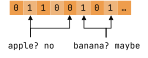
Figure 6: Example of a bloom filter and two predicates: the value
apple is not present since one of the bits it maps to is
0; banana might be present since all the bits it maps to
are 1.
In our case, since the column we filter by only contains unique values and is
already sorted, the min/max statistics suffice, and thus there is no need to add
bloom filters. By default, DataFusion already does not add bloom filters when
writing Parquet files. The figure below checks the impact on throughput of point
reads on a file with (True) and without (False, default) these structures:
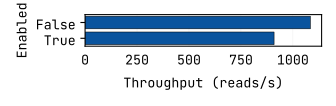
Figure 7: Throughput with and without bloom filters.
In summary, at least for sorted files with many unique values, it is better to
disable both of these structures when writing Parquet files. This can be set
in the OPTIONS part of the SQL COPY
command,
or by changing the
TableParquetOptions
in DataFrame::write_parquet:
COPY (...) to 't.parquet'
OPTIONS (
    DICTIONARY_ENABLED false,
    BLOOM_FILTER_ON_WRITE false
)
let mut parquet_options = ParquetOptions::default();
parquet_options.dictionary_enabled = false;
parquet_options.bloom_filter_on_write = false;
let mut table_options = TableParquetOptions::new();
table_options.global = parquet_options;
df.write_parquet(
    "t.parquet",
    DataFrameWriteOptions::new(),
    Some(parquet_options)
).await?;
File Configuration
Next up, we are going to take a look at what should be the optimal row group and data page sizes for point reads, by doing a simple grid search. The heatmap in Figure 8 shows the throughput for the different combinations.
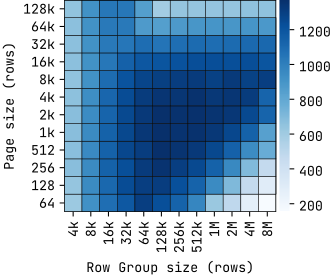
Figure 8: Point read throughput based on the size of the Parquet row groups and data pages (darker is better).
We can conclude that the optimal configurations for point reads are the values around 128k rows per row group and 1k rows per page, which are quite different from the defaults used in DataFusion (1M sized row groups and 20k sized pages). Tiny groups or pages will lead to a large number of them, which means more time when pruning. On the other hand, large groups or pages means less data is pruned and thus more rows are scanned.
But what if we need our Parquet files for both point reads and analytical workloads? Is there a configuration that can serve both efficiently? To answer that, we do another grid search in Figure 9, this time fixing the row group size to 512k rows and varying the number of rows scanned per read (x) and the data page size (y).
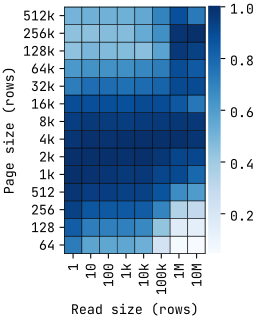
Figure 9: Throughput based on the read size and the size of the Parquet data pages (512k rows per row group). Each cell shows the ratio between its throughput value and the max throughput in its column (darker is better)..
We see that while large reads favor larger pages, and smaller reads favor
smaller pages, we can use around 2k-4k rows per page to achieve a good
throughput for both workloads, meaning we don't need to sacrifice one over the
other. These settings can also be set using the OPTIONS part of the SQL
COPY
command,
or by changing the
TableParquetOptions
in DataFrame::write_parquet:
COPY (...) to 't.parquet'
OPTIONS (
    MAX_ROW_GROUP_SIZE 131072,
    DATA_PAGE_ROW_COUNT_LIMIT 2048
)
Compression
Finally, we will examine how compression affects performance. The optimal values here will be dependent both on the dataset and the user requirements (decoding speed vs storage used), thus the conclusion here might not apply to all cases. With that said, Figure 10 shows the throughput based on the read size and the compression algorithm used, while Figure 11 shows the file size per algorithm.
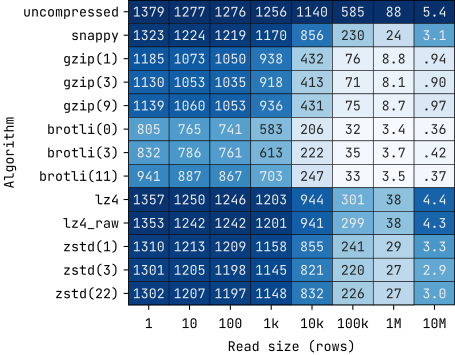
Figure 10: Throughput based on the read size and the compression algorithm. Each cell is shaded based on the ratio between its throughput value and the max throughput in its column (darker is better).
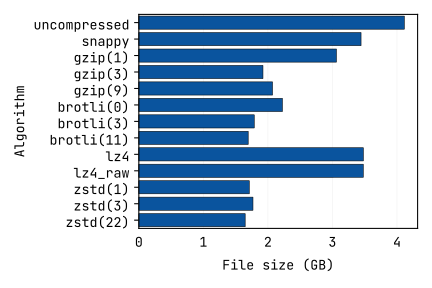
Figure 11: File size based on the compression algorithm used.
The main conclusion here is that, for our dataset, we should use lz4 if we
favor faster speeds (or maybe even uncompressed), while zstd shows the
best space/speed tradeoff (default used in DataFusion). The snappy
algorithm, which is commonly used and even the default to write Parquet files in
systems like Spark and DuckDB, uses around the same space as lz4 for this
dataset but is slower in larger scans in DataFusion.
Execution (Optimizing DataFusion Settings)
Target Partitions
We are now going to optimize the execution itself, starting with the
target_partitions config in DataFusion. This parameter essentially controls
the parallelism of a query, and by default is set to the number of available
cores. However, since point reads require so little work, the overhead of
distributing load to multiple cores outweighs its benefits. So for this next
test (Figure 12) we compare the throughput of both point reads and larger scans
with 1 and 8 (default) partitions.
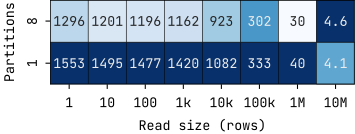
Figure 12: Throughput based on the read size and the number of target partitions. Each cell is shaded based on the ratio between its throughput value and the max throughput in its column (darker is better).
We observe that small reads are faster with a single partition, as extra
ones have the additional cost of coalescing into a single one. On the other
hand, larger reads (in this case, 10M rows) are faster as they can use the
additional parallelism, so this option is very much workload dependent. Luckily,
it can be changed at runtime with SET datafusion.execution.target_partitions =
....
Pushdown Filters
Next up, we are going to take a look at another DataFusion config:
pushdown_filters. This config pushes filters directly to the Parquet scan,
instead of having an extra FilterExec node. Even with this disabled (default),
there is still data pruning done at page-level. The following physical plan
excerpts show the difference between enabling and disabling this feature for a
random lookup:
# pushdown_filters disabled
FilterExec k=<VAL> (output_rows=1)
  DataSourceExec predicate=k=<VAL> (output_rows=1k)

# pushdown_filters enabled
DataSourceExec predicate=k=<VAL> (output_rows=1)
In the default version, DataSourceExec returns 1k rows, which is the size of a
data page, so then the FilterExec cuts it down to the one row we want. The
version with pushdown_filters enabled does everything in the Arrow crate,
returning just one row. To determine the best alternative, we will now compare
the performance using reads of different sizes, with the throughput plotted in
Figure 13.
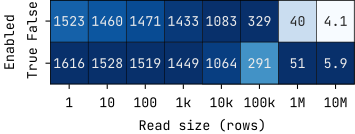
Figure 13: Throughput based on the read size with
pushdown_filters enabled (True) and disabled
(False). Each cell is shaded based on the ratio between its
throughput value and the max throughput in its column (darker is
better).
For both smaller (<10k rows) and larger (>100k rows) reads, we conclude that
enabling pushdown_filters results in a higher throughput. Curiously,
medium sized reads (between 10k and 100k) are faster with pushdown_filters
disabled. It's not clear why this is the case (most likely a combination of
different I/O patterns and filter representation efficiency), but I retested
this multiple times and in different machines and always saw this behavior.
As of the writing of the post, this feature is currently disabled because it slows some queries down. More info can be found at #3463 and #20324.
Metadata Cache
To find data in a Parquet file, DataFusion first has to retrieve and parse the file's built-in metadata. Since this initial process can itself be several times more expensive than a point lookup, DataFusion caches Parquet metadata by default since version 50.0.0 to avoid having to do this at every read (more details at #17000). To see how important this is, we will now take a look at the performance of point reads with and without this cache based on the table size, in Figure 14.
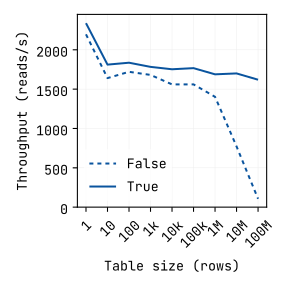
Figure 14: Throughput with (True) and without
(False) caching metadata, based on the table size.
The version that has the metadata cache enabled stays mostly consistent, while
the version without quickly slows down with large files (large file = more
metadata = more processing time). Thus, it is better to keep this caching
enabled if we intend to query the same file more than once. The only tuning
required here might be to increase the cache limit in case we concurrently query
a large number of (large) files, using the
datafusion.runtime.metadata_cache_limit (50MB by default). An overview of the
cache can be accessed using the datafusion-cli tool, through the
metadata_cache() function:
> SELECT path, metadata_size_bytes, hits FROM metadata_cache();
+-----------+---------------------+------+
| path      | metadata_size_bytes | hits |
+-----------+---------------------+------+
| t.parquet | 19752725            | 1    |
+-----------+---------------------+------+
Prepared Statements
Before executing a SQL query, DataFusion first builds and optimizes the logical plan, from which it then builds and optimizes the physical plan. For point reads specifically, this optimization process has quite a significant weight on performance, as depicted by Figure 15, which shows the CPU profiling of a point read benchmark.
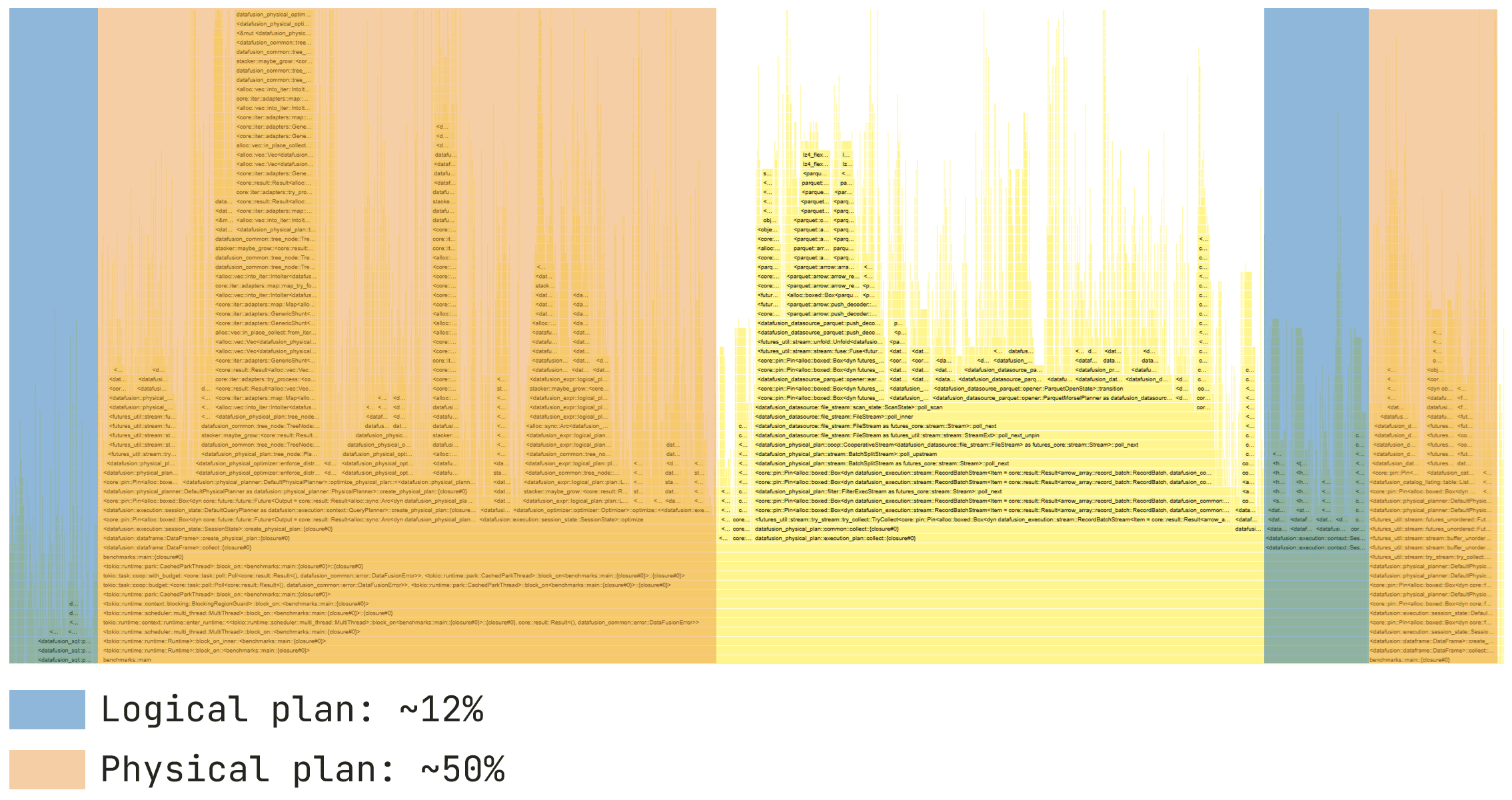
Figure 15: CPU time profiling in a point read benchmark.
Of the total CPU time, around 12% is spent on building the logical plan, while 50% is spent on the physical one. If we execute the same query multiple times or only change its parameters, it will be worth it to cache the plans by using prepared statements. However, prepared statements in DataFusion currently only reuse the logical plan.
To determine the potential benefits of having prepared statements that reuse the
physical plan, I implemented a version that builds and caches the plan using
placeholder arguments. Then, at runtime, the plan is cloned and any node with
placeholders (e.g., DataSourceExec, FilterExec, ProjectionExec) is
recreated with the final arguments. Figure 16 compares the throughput with this
version (physical) vs DataFusion's prepared statements (logical) and no
prepared statements (no), using different types of point read queries.
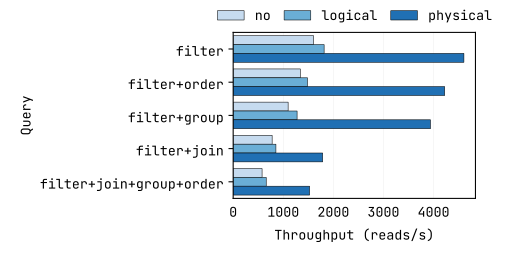
Figure 16: Throughput of different point read queries with no
prepared statements (no), DataFusion's builtin prepared
statements (logical), and the custom implementation that
reuses physical plans (physical).
While reusing the logical plan offers an improvement over not reusing anything, it's clear that reusing the physical plan leads to a considerably higher throughput, doubling or even tripling performance. Currently, this is not available in DataFusion. See #26706 for more details.
Memory Allocator
Another important contributor to the overall performance in DataFusion is the memory allocator used. As we will see in Figure 17, this is true for both point reads and larger scans.
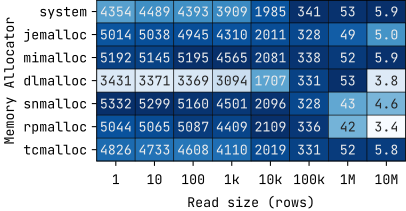
Figure 17: Throughput of different memory allocators based on the
read size (system is the default). Each cell is shaded
based on the ratio between its throughput value and the max throughput
in its column (darker is better).
The results show that the allocators have widely different throughputs. Smaller
reads are faster with snmalloc or mimalloc, while larger ones work better
with system, mimalloc, or tcmalloc.
Thus, in our workload, mimalloc appears to be the overall best choice.
It's no coincidence that it's the one used by datafusion-cli and the
DataFusion Python library.
Runtime
The last topic we are going to look at concerns the tokio runtime used by
DataFusion. tokio provides asynchronous processing
capabilities to Rust, and is particularly useful in DataFusion where queries
often need to wait for I/O or network when retrieving data, which they can do so
by releasing the current thread to another task. Andrew Lamb gave a talk at
Tokio Conf 2026 titled "Using Tokio for CPU-Bound Tasks (Works Really Well)"
about this.
However, for workloads where we have multiple different clients executing many
queries that access tiny amounts of data, I noticed that the throughput was not
scaling as well as I'd hoped. My default implementation was the most straight
forward, creating one tokio::task for each client (each with its own
SessionContext):
tokio::task::spawn(
    async move {
        let ctx = SessionContext::new();
        // do work
    }
)
After experimenting with different configurations, I found that having a separate single-threaded runtime for each client scaled better, as illustrated by the results in Figure 18:
tokio::task::spawn(async move {
    std::thread::spawn(move || {
        let rt = tokio::runtime::Builder::new_current_thread()
            .enable_all()
            .build()
            .unwrap();
        rt.block_on(async {
            let ctx = SessionContext::new();
            // do work
        })
    })
})
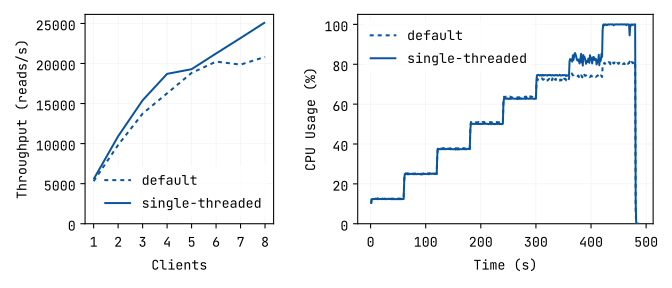
Figure 18: Throughput and CPU usage of the single multi-thread
runtime (default) vs the multiple single-threaded runtimes
(single-threaded).
We see in the results that the default version does not really improve with 7 or 8 clients, as the CPU is not being fully utilized, unlike the multiple single-threaded runtimes version. Of course, with the latter technique any analytical queries will only be able to use a single thread, so this is only recommended for point queries.
Summary
Table 1 shows an overview of the main optimizations tested. In total, we managed to improve the throughput in almost 8x over the baseline and reduce the response time to sub 0.2ms, demonstrating that DataFusion is well capable of handling point read workloads.
Table 1: Throughput and response time for points reads based on the optimization (single client; each optimization builds on the previous one).
| Optimization | Throughput (reads/s) | Response time (ms) |
|---|---|---|
| Sorted file | 698 | 1.43 |
| Disable Dictionary Encoding | 1062 | 0.94 |
| Row Group / Page Configuration | 1370 | 0.73 |
| Target Partitions | 1553 | 0.64 |
| Pushdown Filters | 1616 | 0.62 |
| Prepared Statements | 4606 | 0.22 |
| Mimalloc Allocator | 5192 | 0.19 |
| Single-threaded Runtimes | 5433 | 0.18 |
Acknowledgements
Thank you to INESC TEC for supporting my work on DataFusion. Thanks to Andrew Lamb, Nga Tran, and Pratibha Rana (as well as Datadog) for organizing the DataFusion meetup in Boston where this work was originally presented. Thanks to Andrew Lamb as well for reviewing this blog post.
About the Author
Nuno Faria is a researcher at INESC TEC and an Apache DataFusion committer.
About DataFusion
Apache DataFusion is an extensible query engine toolkit, written in Rust, that uses Apache Arrow as its in-memory format. DataFusion and similar technology are part of the next generation “Deconstructed Database” architectures, where new systems are built on a foundation of fast, modular components, rather than as a single tightly integrated system.
The DataFusion community is always looking for new contributors to help improve the project. If you are interested in learning more about how query execution works, help document or improve the DataFusion codebase, or just try it out, we would love for you to join us.