

Apache DataFusion Comet: Release Process#
This documentation explains the release process for Apache DataFusion Comet. Some preparation tasks can be performed by any contributor, while certain release tasks can only be performed by a DataFusion Project Management Committee (PMC) member.
Release Cycle#
Comet targets a minor release every four to six weeks (see Release Cadence). Each release starts by cutting the release branch. The weeks after that are for finding and fixing regressions on the branch, and the release candidate comes last.
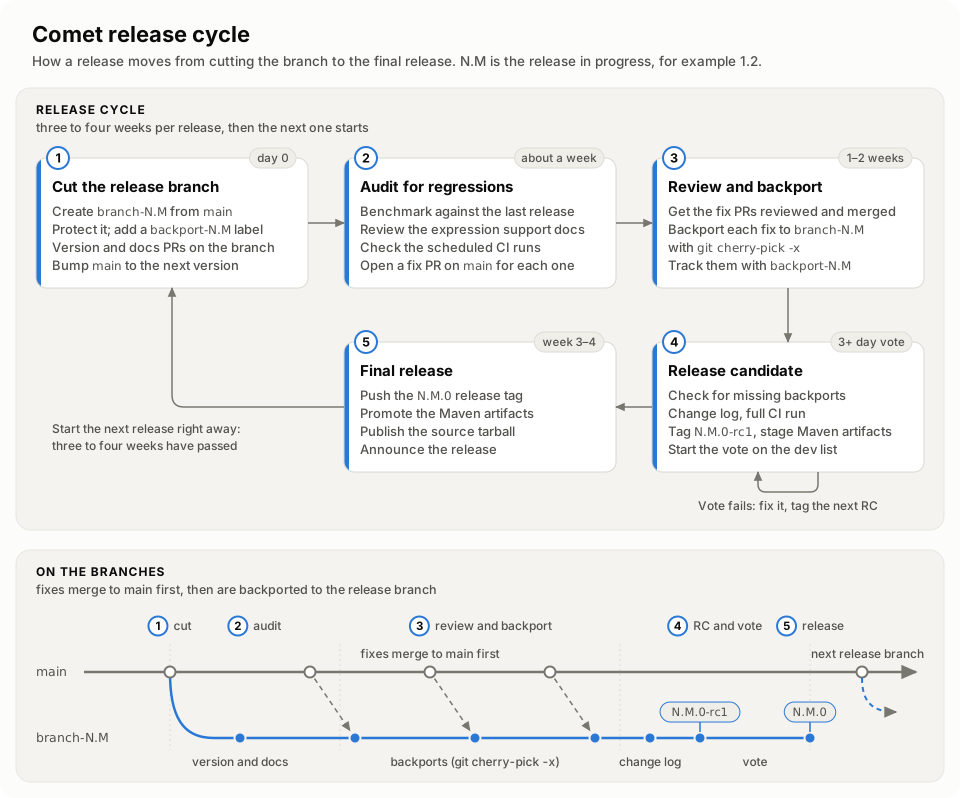
Cut the release branch from
main. From then on, new work goes tomainfor the next release, and the release branch only takes backported fixes and release mechanics such as the version bump.Audit the release branch for regressions for about a week, and open a pull request against
mainto fix each one.Review the fixes and backport them to the release branch over the next one to two weeks.
Create a release candidate and hold the vote. If the vote fails, fix the problems and create the next release candidate.
Publish the release once the vote passes.
These steps take three to four weeks, so the next release starts as soon as the current one ships.
Checklist#
The following is a quick-reference checklist for the full release process. See the detailed sections below for instructions on each step.
Cut the release branch:
Create the release branch and its backport label
Protect the release branch in
.asf.yamlGenerate release documentation
Update Maven version in release branch
Update version in main for next development cycle
Find and fix regressions:
Review expression support status and the user guide
Benchmark against the previous release
Check the scheduled CI runs are healthy
Fix each regression on
mainand backport the fix
Create the release candidate:
Check for fixes missing from the release branches
Generate the change log and PR it against the release branch
Run the full CI suite on the release branch
Tag the release candidate
Build the jars from the release candidate tag
Update documentation for the new release
Publish Maven artifacts to staging
Create the release candidate tarball
Start the email voting thread
Once the vote passes:
Publish source tarball
Create GitHub release
Promote Maven artifacts to production
Push the release tag
Bring the finalized change log into main
Close the vote and announce the release
Post release:
Register the release with Apache Reporter
Delete old RCs and releases from SVN
Write a blog post
Start the next release
Cutting the Release Branch#
This part of the process can be performed by any committer.
Here are the steps, using the 0.13.0 release as an example.
Create Release Branch#
This document assumes that GitHub remotes are set up as follows:
$ git remote -v
apache	git@github.com:apache/datafusion-comet.git (fetch)
apache	git@github.com:apache/datafusion-comet.git (push)
origin	git@github.com:yourgithubid/datafusion-comet.git (fetch)
origin	git@github.com:yourgithubid/datafusion-comet.git (push)
Create a release branch from the latest commit in main and push to the apache repo:
git fetch apache
git checkout main
git reset --hard apache/main
git checkout -b branch-0.13
git push apache branch-0.13
Creating the branch is the only direct push to it. After protecting the branch (next step), all later changes to the release branch (documentation, version bump, changelog) go through pull requests targeting it.
Also create the branch’s backport label. Committers add it to pull requests on main that should be backported to
the branch; see Backporting to Release Branches.
gh label create backport-0.13 --repo apache/datafusion-comet \
  --description "Candidate for backporting to 0.13 release branch"
Protect the Release Branch#
Add the new branch to protected_branches in .asf.yaml so it requires a pull request and review, the same as
main. ASF applies .asf.yaml from the default branch, so this is a PR against main:
protected_branches:
  main:
    required_pull_request_reviews:
      required_approving_review_count: 1
  branch-0.13:
    required_pull_request_reviews:
      required_approving_review_count: 1
All release branches stay protected, including older ones, so released code cannot be pushed to directly.
Once the pull request merges, check that the protection took effect:
gh api repos/apache/datafusion-comet/branches/branch-0.13 --jq .protected
This prints true once ASF has applied the change. If it still prints false, check that the branch is listed
under protected_branches on main.
Protection requires a review but not a green CI run, so check that a pull request’s run passed before merging it.
The release branch has no merge queue, no nightly run, and no CI on push, so a pull request targeting it runs every
suite that the PR, queue, and nightly tiers run on main. That includes the version bump pull request below and
every backport. The documentation and change log pull requests change only Markdown, so the path filters skip the
heavy suites for them. Release branches explains what runs and
why. The full CI run before tagging tests the branch with every change merged.
Generate Release Documentation#
The docs on main contain only template markers; CI fills them at publish time. A release branch instead
commits the generated content so the archived docs for the release render real tables. Run the script to
generate the config reference, refresh the Implementation column of the Spark Expression Support page, and
produce the per-Spark-version compatibility pages, freezing them onto the branch:
./dev/generate-release-docs.sh
git add docs/source/user-guide/latest/
git commit -m "Generate docs for 0.13.0 release"
The script runs one Maven build per supported Spark version, so it takes a while. Open a PR with this commit targeting the release branch.
Update Maven Version#
Open a PR targeting the release branch that changes the Maven version from 0.13.0-SNAPSHOT to 0.13.0 in:
the
pom.xmlfiles:pom.xml,common/pom.xml,spark/pom.xml, andspark-integration/pom.xmlthe
<comet.version>property in the Spark test diffs underdev/diffsthe
cometversion in the Iceberg test diffs underdev/diffs/iceberg, which use a Gradle version catalog entry (comet = "0.13.0") rather than a Maven property
There is no need to update the Rust crate versions because they will already be 0.13.0.
Once the version is bumped, verify that no references to the old version remain:
git grep -n '0.13.0-SNAPSHOT' -- . ':!docs/source/changelog'
Any hit outside the change log is a place that will break on the release branch. Note that dropping the
-SNAPSHOT qualifier changes the built artifact file names, so anything that locates the jar by glob must
match a bare version too. Prefer patterns such as comet-spark-spark3.5_2.12-*.jar over
comet-spark-spark3.5_2.12-*-SNAPSHOT.jar, and prefer resolving the jar by glob over hardcoding a version.
The release branch has the same CI workflows as main, so a -SNAPSHOT-only glob in a test harness or script
fails only after the release branch is cut. The version bump pull request is where it shows up. It changes the
pom.xml files, so it runs the suites that find the jar by file name or version, such as the PyArrow UDF tests and
the Spark SQL and Iceberg suites. The Spark SQL suite for Spark 3.4 runs only with the run-spark-3.4-tests label.
Update Version in main#
Create a PR against the main branch to prepare for developing the next release:
Update the Rust crate version to
0.14.0innative/Cargo.tomland in eachcontrib/*/native/Cargo.toml. The contrib crates sit outside thenative/workspace, so they do not inherit its version. Then runcargo update --workspaceinnative/and in each contrib crate that has its ownCargo.lock.Update the Maven version to
0.14.0-SNAPSHOTin the same set of files listed above (thepom.xmlfiles, the Spark test diffs underdev/diffs, and the Iceberg test diffs underdev/diffs/iceberg).
Finding and Fixing Regressions#
Once the release branch is cut, spend about a week auditing it for regressions, then one to two weeks getting the fixes reviewed and backported. Anyone can help with both.
Audit the Release Branch#
Check that the user guide accurately reflects what is being released:
Review the Spark Expression Support page and the supported operators list in the user guide. The expression page is the source of truth for expression support status, so verify that any expressions added or changed since the last release appear there with an accurate status (✅ / ⚠️ / 🔜 / 💤).
Spot-check the support status of individual expressions by running tests or queries to confirm they work as documented.
Look for any expressions that may have regressed or changed behavior since the last release and update the documentation accordingly.
Run benchmarks (such as TPC-H and TPC-DS) on the release branch and compare them against the previous release to check for performance regressions. See the Comet Benchmarking Guide for instructions.
Check that the scheduled CI runs have been healthy over the release window. Most of Comet’s coverage of the
non-default Spark and Iceberg versions runs nightly rather than on pull requests, so a nightly run that has been
failing — or one that silently stopped firing — means the release is going out with less testing behind it than the
tier table suggests. A scheduled run has no pull request to turn red, and publish_snapshot.yml does
not report its own failures, so this has to be looked at deliberately. See
Checking that the scheduled runs are healthy for the commands
and for how to tell a genuinely quiet night from a broken one.
These are tasks where agentic coding tools can be particularly helpful — for example, scanning the codebase for newly registered expressions and cross-referencing them against the documented list, or generating test queries to verify expression support status.
Fix and Backport Regressions#
File an issue for each regression and open a pull request against main that fixes it. Committers add the
backport-0.13 label to these pull requests, and once each one merges it is backported to the release branch as
described in Backporting to Release Branches. The label shows which fixes still need to reach the
branch.
Create the release candidate once the fixes have been backported.
Creating the Release Candidate#
This part of the process can be performed by any committer.
Check for Missing Backports#
Before generating the change log, check that the new branch has every fix from the older release branches that are still taking backports, and backport any that are missing. For a patch release, check the release branch against every newer release branch instead, so that a fix doesn’t ship in the older release line first. Checking Release Branches Before a Release shows how.
Generate the Change Log#
Generate a change log to cover changes between the previous release and the release branch HEAD by running
the provided dev/release/generate-changelog.py.
It is recommended that you set up a virtual Python environment and then install the dependencies:
cd dev/release
python3 -m venv venv
source venv/bin/activate
pip3 install -r requirements.txt
To generate the changelog, set the GITHUB_TOKEN environment variable to a valid token and then run the script
providing two commit ids or tags followed by the version number of the release being created. The following
example generates a change log of all changes between the previous version and the current release branch HEAD revision.
export GITHUB_TOKEN=<your-token-here>
python3 generate-changelog.py 0.12.0 HEAD 0.13.0 > ../../docs/source/changelog/0.13.0.md
Open a PR adding this change log targeting the release branch. Generate it late, once backports to the release
branch are complete; if more changes land on the release branch before the release candidate is tagged,
regenerate it and update the PR. After the release is approved and tagged, open a separate PR to bring the same
change log file into main.
Run the Full CI Suite#
Once the generated docs, version bump, and change log have merged to the release branch, run every CI suite
against it. Each pull request ran against the branch as it stood when its run started, so nothing has yet tested
the branch with all of them merged. Pull requests there also skip the Spark SQL suite for Spark 3.4 unless it is
labeled, and Miri, which runs only on a schedule on main.
A dispatch runs every job in the release branch’s own ci.yml, including docs, which publishes the website. So
first check that the branch limits that job to main: the if: this prints must require
github.ref == 'refs/heads/main'. A branch without that guard publishes its own docs over the site.
git fetch apache
git show apache/branch-0.13:.github/workflows/ci.yml | sed -n '/^  docs:/,/uses:/p'
Then dispatch both workflows on the release branch:
gh workflow run ci.yml --repo apache/datafusion-comet --ref branch-0.13
gh workflow run miri.yml --repo apache/datafusion-comet --ref branch-0.13
A dispatched ci.yml run ignores the tiers and the path filters. It runs every suite in the
tier table, including the Spark SQL suite for Spark 3.4, which sits outside every tier.
miri.yml runs the unsafe code checks, which are not part of ci.yml. Expect the runs to take a few hours.
A failed dispatched run does not open a ci-nightly-failure issue, so check the result yourself. This prints the
latest dispatched run of each workflow on the branch:
for wf in ci.yml miri.yml; do
  gh api "repos/apache/datafusion-comet/actions/workflows/$wf/runs?branch=branch-0.13&event=workflow_dispatch&per_page=1" \
    --jq ".workflow_runs[] | \"$wf\t\(.head_sha)\t\(.status)\t\(.conclusion)\t\(.html_url)\""
done
Both runs must be green at the commit you are about to tag. If anything merges to the release branch after the runs start, run them again. Repeat this for every release candidate.
Tag the Release Candidate#
Ensure that the Maven version update and change log have been merged to the release branch, and that the full CI run is green at the commit you are tagging, before tagging.
Tag the release branch with 0.13.0-rc1 and push to the apache repo:
git fetch apache
git checkout branch-0.13
git reset --hard apache/branch-0.13
git tag 0.13.0-rc1
git push apache 0.13.0-rc1
Build the jars#
A note on workspace cleanliness#
The common/pom.xml resource configuration unconditionally bundles
native/target/{x86_64,aarch64}-apple-darwin/release/libcomet.dylib into the
common jar when those files exist on disk. Maven’s clean removes
common/target but does not touch Cargo’s native/target directory, so a
stale dylib left over from a prior local make release or make release-linux
on the release manager’s workstation can silently end up in a release jar
(see #2232 for the
incident in 0.9.1).
The build-release-comet.sh script now runs cargo clean for you, but as a
defensive measure, prefer running the release build from a fresh clone of the
repository rather than your day-to-day working tree.
Setup to do the build#
The build process requires Docker. Download the latest Docker Desktop from https://www.docker.com/products/docker-desktop/. If you have multiple docker contexts running switch to the context of the Docker Desktop. For example -
$ docker context ls
NAME              DESCRIPTION                               DOCKER ENDPOINT                               ERROR
default           Current DOCKER_HOST based configuration   unix:///var/run/docker.sock
desktop-linux     Docker Desktop                            unix:///Users/parth/.docker/run/docker.sock
my_custom_context *                                         tcp://192.168.64.2:2376

$ docker context use desktop-linux
Run the build script#
The build-release-comet.sh script will create a docker image for each architecture and use the image
to build the platform specific binaries. These builder images are created every time this script is run.
The branch or tag to build is required, and the script optionally allows overriding the repository. For a release,
always build from the release candidate tag created in the previous step. The remote tag is used to build the native
binaries, while the local checkout is used to build the final uber jar, so check out the same tag locally before
running the script.
Usage: build-release-comet.sh [options]

This script builds comet native binaries inside a docker image. The image is named
"comet-rm" and will be generated by this script

Options are:

-r [repo]   : git repo (default: https://github.com/apache/datafusion-comet.git)
-b [ref]    : git branch or tag to build (required)
-t [tag]    : tag for the spark-rm docker image to use for building (default: "latest").
Example:
git checkout 0.13.0-rc1
cd dev/release && ./build-release-comet.sh -b 0.13.0-rc1 && cd ../..
Build output#
The build output is installed to a temporary local maven repository. The build script will print the name of the repository location at the end. This location will be required at the time of deploying the artifacts to a staging repository.
Publishing Documentation#
In docs directory:
Update the main method in
generate-versions.pyto promote the new release to the current one and move the previously current release into the list of older versions:
    latest_released_version = "0.13.0"
    previous_versions = ["0.10.0", "0.11.0", "0.12.0"]
Add a new line to
build.shto delete the locally clonedcomet-*branch for the new release e.g.comet-0.13. Every version referenced ingenerate-versions.pyneeds a line here, otherwise a rebuild reuses the stale clone from the previous run.Update
docs/source/user-guide/index.md: change the “current stable release” sentence and the versioned entry in the toctree (e.g.0.13.x (current) <0.13/index>).Update
docs/source/user-guide/older-versions.md: point the “current stable release” link at the new release and add the previously current release to the toctree.
Note that older user guides are kept rather than dropped, so the lists in generate-versions.py, build.sh, and
older-versions.md grow with each release.
Test the documentation build locally, following the instructions in docs/README.md.
Once verified, create a PR against the main branch with these documentation changes. After merging, the docs will be deployed to https://datafusion.apache.org/comet/ by the documentation publishing workflow.
Note that the download links in the installation guide will not work until the release is finalized, but having the documentation available could be useful for anyone testing out the release candidate during the voting period.
Publishing the Release Candidate#
This part of the process can mostly only be performed by a PMC member.
Publish the maven artifacts#
Setup maven#
One time project setup#
Setting up your project in the ASF Nexus Repository from here: https://infra.apache.org/publishing-maven-artifacts.html
Release Manager Setup#
Set up your development environment from here: https://infra.apache.org/publishing-maven-artifacts.html
Build and publish a release candidate to nexus.#
The script publish-to-maven.sh will publish the artifacts created by the build-release-comet.sh script.
The artifacts will be signed using the gpg key of the release manager and uploaded to the maven staging repository.
Note that installed GPG keys can be listed with gpg --list-keys. The gpg key is a 40 character hex string.
Note: This script needs xmllint to be installed. On macOS xmllint is available by default.
On Ubuntu apt-get install -y libxml2-utils
On RedHat yum install -y xmlstarlet
./dev/release/publish-to-maven.sh -h
usage: publish-to-maven.sh options

Publish signed artifacts to Maven.

Options
-u ASF_USERNAME - Username of ASF committer account
-r LOCAL_REPO - path to temporary local maven repo (created and written to by 'build-release-comet.sh')

The following will be prompted for -
ASF_PASSWORD - Password of ASF committer account
GPG_KEY - GPG key used to sign release artifacts
GPG_PASSPHRASE - Passphrase for GPG key
example
./dev/release/publish-to-maven.sh -u release_manager_asf_id -r /tmp/comet-staging-repo-VsYOX
ASF Password :
GPG Key (Optional):
GPG Passphrase :
Creating Nexus staging repository
...
In the Nexus repository UI (https://repository.apache.org/) locate and verify the artifacts in staging (https://central.sonatype.org/publish/release/#locate-and-examine-your-staging-repository).
The script closes the staging repository but does not release it. Releasing to Maven Central is a manual step performed only after the vote passes (see Publishing Maven Artifacts below).
Note that the Maven artifacts are always published under the final release version (e.g. 0.13.0), not the RC
version — the -rc1 / -rc2 suffix only appears in the git tag and the source tarball in SVN. Because the script
creates a new staging repository on each run, re-staging the same version for a subsequent RC is supported as long
as no staging repository for that version has been released to Maven Central.
Create the Release Candidate Tarball#
The create-tarball.sh script creates a signed source tarball and uploads it to the dev subversion repository.
Prerequisites#
Before running this script, ensure you have:
A GPG key set up for signing, with your public key uploaded to https://pgp.mit.edu/
Apache SVN credentials (you must be logged into the Apache SVN server)
The
requestsPython package installed (pip3 install requests)
Run the script#
Run the create-tarball script on the release candidate tag (0.13.0-rc1):
./dev/release/create-tarball.sh 0.13.0 1
This will generate an email template for starting the vote.
Start an Email Voting Thread#
Send the email that is generated in the previous step to dev@datafusion.apache.org.
The verification procedure for voters is documented in
Verifying Release Candidates.
Voters can also use the dev/release/verify-release-candidate.sh script to assist with verification:
./dev/release/verify-release-candidate.sh 0.13.0 1
If the Vote Fails#
If the vote does not pass, address the issues raised, increment the release candidate number, and repeat from
the Tag the Release Candidate step. For example, the next attempt would be tagged
0.13.0-rc2.
Before staging the next RC, drop the previous RC’s staging repository in the
Nexus UI by selecting it and clicking “Drop”. This avoids
leaving multiple closed staging repositories for the same version and prevents accidentally releasing the wrong
one when the vote eventually passes. The Maven version (e.g. 0.13.0) is shared across all RCs, so each run of
publish-to-maven.sh creates a new staging repository for the same GAV — only one of them should ever be
released to Maven Central.
Publishing Binary Releases#
Once the vote passes, we can publish the source and binary releases.
Publishing Source Tarball#
Run the release-tarball script to move the tarball to the release subversion repository.
./dev/release/release-tarball.sh 0.13.0 1
Create a release in the GitHub repository#
Go to https://github.com/apache/datafusion-comet/releases and create a release for the release tag, and paste the changelog in the description.
Publishing Maven Artifacts#
Promote the Maven artifacts from staging to production by visiting https://repository.apache.org/#stagingRepositories and selecting the staging repository and then clicking the “release” button.
Push a release tag to the repo#
Push a release tag (0.13.0) to the apache repository.
git fetch apache
git checkout 0.13.0-rc1
git tag 0.13.0
git push apache 0.13.0
Reply to the vote thread to close the vote and announce the release. The announcement email should include:
The release version
A link to the release notes / changelog
A link to the download page or Maven coordinates
Thanks to everyone who contributed and voted
Post Release#
Register the release#
Register the release with the Apache Reporter Service using
a version such as COMET-0.13.0.
Delete old RCs and Releases#
See the ASF documentation on when to archive for more information.
Deleting old release candidates from dev svn#
Release candidates should be deleted once the release is published.
Get a list of DataFusion Comet release candidates:
svn ls https://dist.apache.org/repos/dist/dev/datafusion | grep comet
Delete a release candidate:
svn delete -m "delete old DataFusion Comet RC" https://dist.apache.org/repos/dist/dev/datafusion/apache-datafusion-comet-0.13.0-rc1/
Deleting old releases from release svn#
Only the latest release should be available. Delete old releases after publishing the new release.
Get a list of DataFusion releases:
svn ls https://dist.apache.org/repos/dist/release/datafusion | grep comet
Delete a release:
svn delete -m "delete old DataFusion Comet release" https://dist.apache.org/repos/dist/release/datafusion/datafusion-comet-0.12.0
Write a blog post#
Writing a blog post about the release is a great way to generate more interest in the project. We typically create a Google document where the community can collaborate on a blog post. Once the content is agreed then a PR can be created against the datafusion-site repository to add the blog post. Any contributor can drive this process.
Start the Next Release#
The release cycle takes three to four weeks, so start the next release right away by cutting its release branch. See Release Cycle.